Search

Dark theme | Light theme
Showing posts with label XSLT. Show all posts

January 15, 2011

Groovy Goodness: Create GMetrics Report with XSLT

With GMetrics we can analyze complexity and size of our Groovy classes and methods. The default HTML reports shows basic information, but if we want to create our own HTML report we best use the XML output and use XSLT to create a HTML report. In a previous blog we learned how to use XSLT to transform the XML output from CodeNarc to a HTML report. In this blog post we see how we can create XML output and how to format it to a HTML report.

January 10, 2011

Groovy Goodness: Create CodeNarc Reports with XSLT

CodeNarc is a tool to analyze Groovy code for style issues, bad practices and defects. The default output after running CodeNarc is a HTML report. In this report we can see which packages and files have violated the rules. We can change the default HTML report output and set it to XML output. With the XML output we can create flexible reports using XSLT. Now we can replace the more basic HTML default output with our own defined HTML reports. For example we can include our own logo or only display rule information for the rules that are violated. In this post we see how we can create a custom HTML CodeNarc report.

November 21, 2008

Copy template for XSLT in NetBeans

Cocoon has a great way to split up big XSL stylesheet into multiple little stylesheets. With the Cocoon pipeline we can go from one stylesheet to the other. This results in better maintainable stylesheets. Because one stylesheet is executed after another in a pipeline we want to pass around the XML. For example one stylesheet will handle a product element from an order XML and we want to give the rest of the order XML to the next stylesheet. The code to do this is easy:

<xsl:template match="@*|node()">
    <xsl:copy>
        <xsl:apply-templates select="@*"/>
        <xsl:apply-templates/>
    </xsl:copy>
</xsl:template>

Because we need this code so much it is easy to make a code template for it in NetBeans. We go to Tools | Options | Editor | Code Templates and select XML as the language. We click on the New button to create a new code template. NetBeans shows a dialog window with an input field for the abbreviation we want to use. We type ct and click the OK button. We now see our abbreviation is added and we can type our code in the Expanded text tab. We type

<xsl:template match="@*|node()">
    <xsl:copy>
        <xsl:apply-templates select="@*"/>
        <xsl:apply-templates/>
    </xsl:copy>
</xsl:template>
We can add a short description in the Description tab. Let's type Copy template for XSLT. Finally at the bottom we see Expand Template on. Here we can define which character NetBeans will react to after we type ct in an XSL stylesheet to expand the template code. Let's leave it to the Tab character.
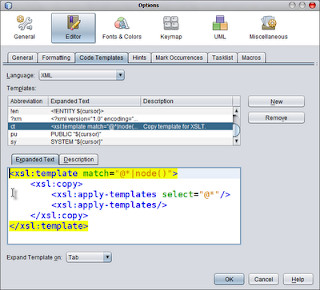
Now when we return to the NetBeans code editor and we are working on a XSL stylesheet, we can type ct, press the Tab key and we get the complete code inserted into our stylesheet.

Code completion for XSLT 2.0 in NetBeans 6.5

I have to edit a lot of XSLT files for my current project. Most files are XSLT 2.0 stylesheets and the previous versions of NetBeans didn't have code completion while editing the files. But NetBeans 6.5 has code completion for XSL 2.0 stylesheets! This really is a time saver for me. To enable code completion we must install the XSLT plugin. We go to Tools | Plugins | Available plugins and look for the XSLT plugin in the SOA category. After the plugin is installed we have code completion in the editor.

July 4, 2008

Copy XML as-is with XSLT

Working with Cocoon pipelines makes it easy to modularize XSLT. Because each XSLT module contains a small part of the functionality we usually have to copy along a lot of the XML structure. The XML structure can than be used in a following XSL transformation. The following piece of code will copy all XML:

    <xsl:template match="*">
        <xsl:copy>
            <xsl:apply-templates select="@*|node()"/>
        </xsl:copy>
    </xsl:template>
    <xsl:template match="@*|text()|comment()|processing-instruction()">
        <xsl:copy-of select="."/>
    </xsl:template>